AI add-in for Excel · Windows, Mac and Excel on the web

Turn your Excel data into maps, AI insights, and smarter decisions.

Map your customers, jobs, properties and field reports. Then let AI do the reading: it understands your comments, answers questions about your map and shows which areas need attention, without leaving Excel.
  • Ask your map in plain words
  • AI reads your comments
  • Charts on demand
  • Hotspots and risky areas
See plans See real examples
From $5.99 / month Your data stays in your workbook Cancel any time
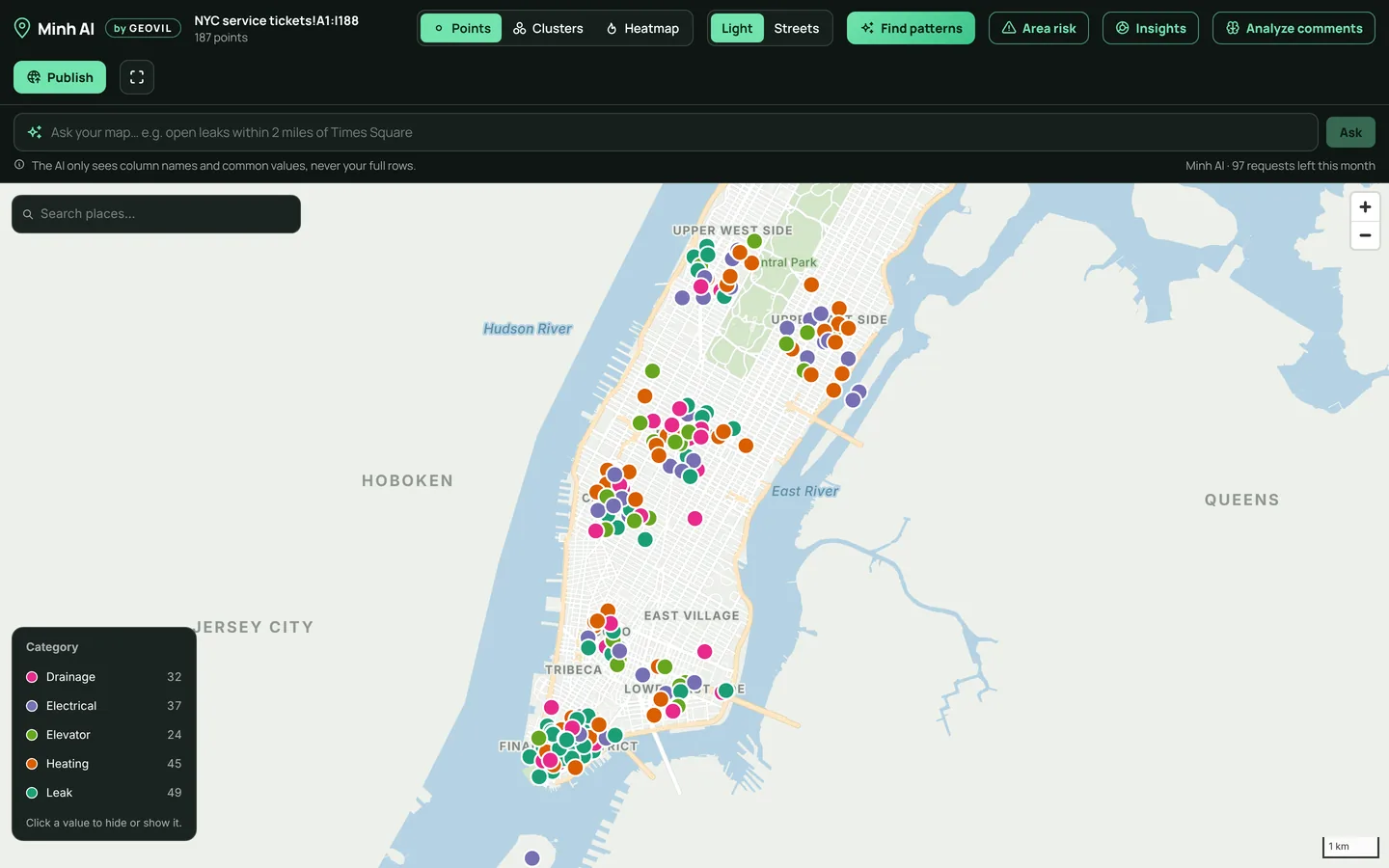
Minh AI map in Excel: 187 service tickets in Manhattan, colored by category
WHO USES MINH AI?

From sales teams to field technicians, Minh AI transforms your everyday Excel files into maps, insights, and answers.

A salesperson shaking hands with a client

Sales & Business Development

See where your customers are.

Put customers and prospects on a map, identify untapped opportunities, and plan local visits more effectively.

A technician checking equipment with a tablet

Maintenance & Field Services

Find recurring problems faster.

Map incidents and service reports to identify recurring issues, understand their causes, and focus your team where it matters most.

An engineer inspecting a power line and a telecom tower

Utilities & Infrastructure

Make sense of field reports.

Map assets and reported failures to identify the areas that carry the highest risk across your network.

Also works for logistics, real estate, operations, public services, construction, and retail networks.

  • Logistics
  • Real estate
  • Operations
  • Public services
  • Construction
  • Retail networks
SEE THE DIFFERENCE

Your existing Excel file. A completely new view.

Real Minh AI screens on example data: 187 service tickets in Manhattan. No special spreadsheet format required.
EXAMPLE 01 · FIELD MAINTENANCE

From technician notes to recurring causes

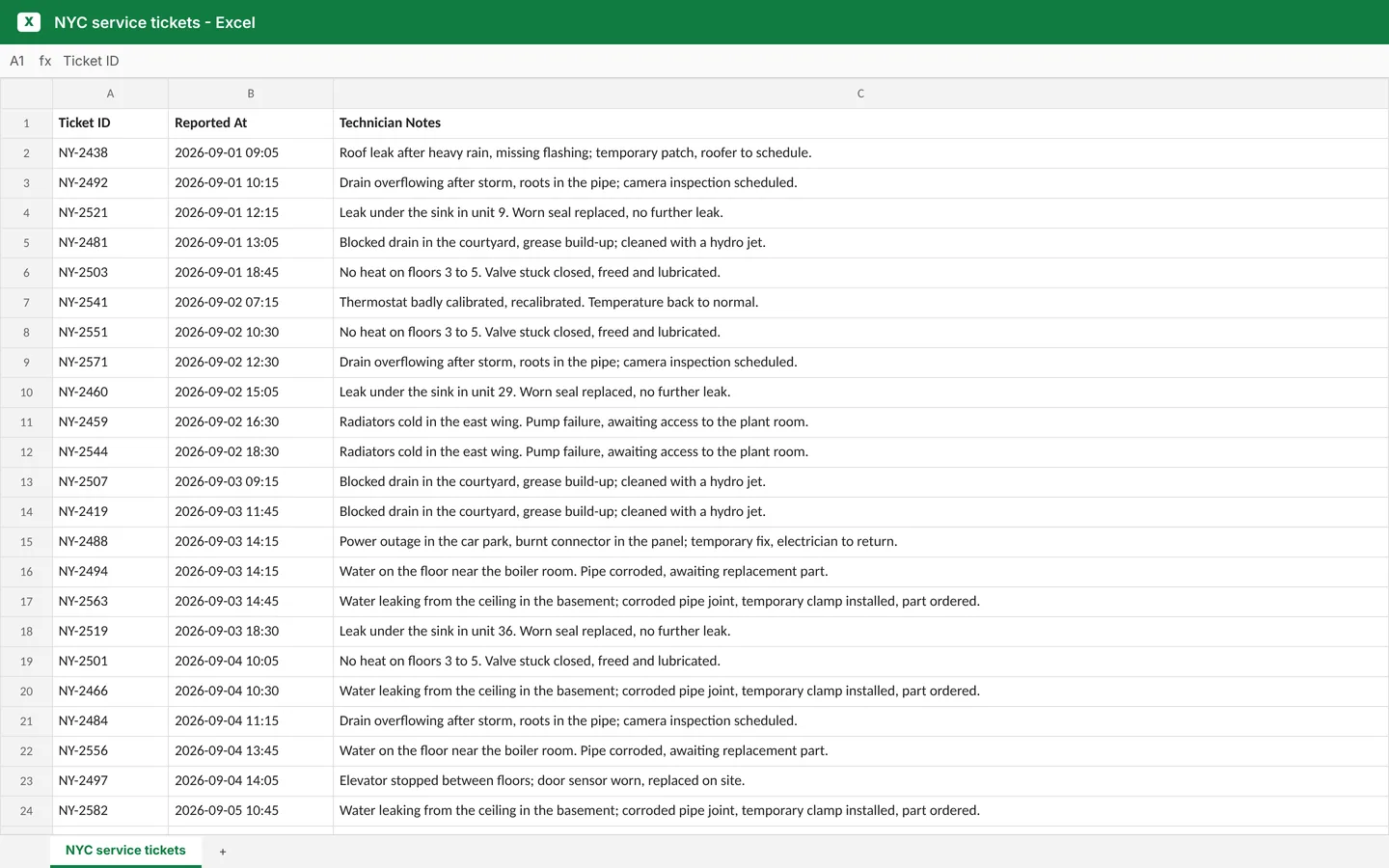
BEFORE · YOUR SHEET
The Excel sheet before Minh AI
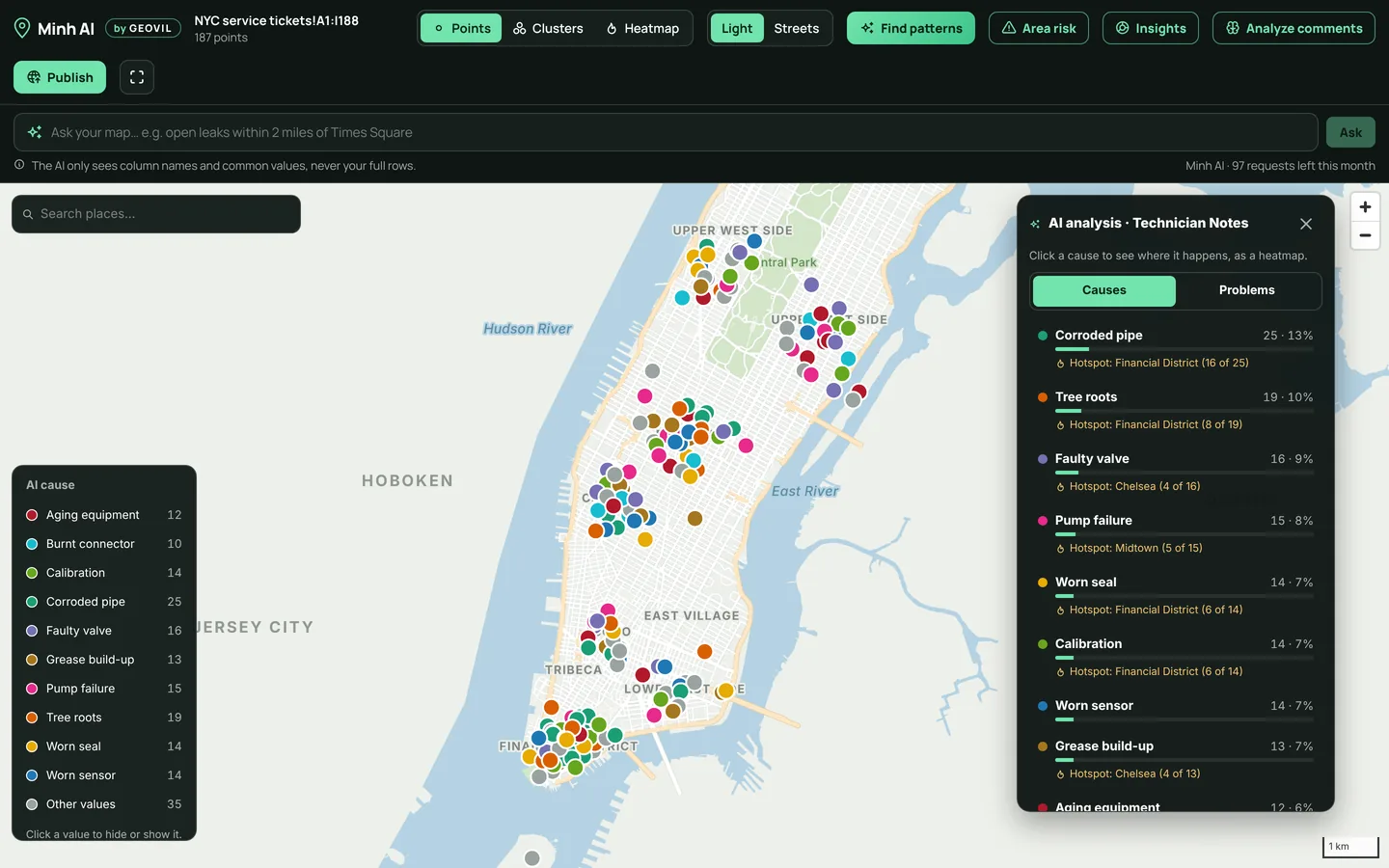
WITH MINH AI
From technician notes to recurring causes
BeforeHundreds of written notes, one per row: impossible to compare.
With Minh AIAI reads every note, fills new columns (problem, cause, action, status) and shows where each cause happens.
What you gainThe causes that keep coming back, and the areas behind them.
EXAMPLE 02 · OPERATIONS

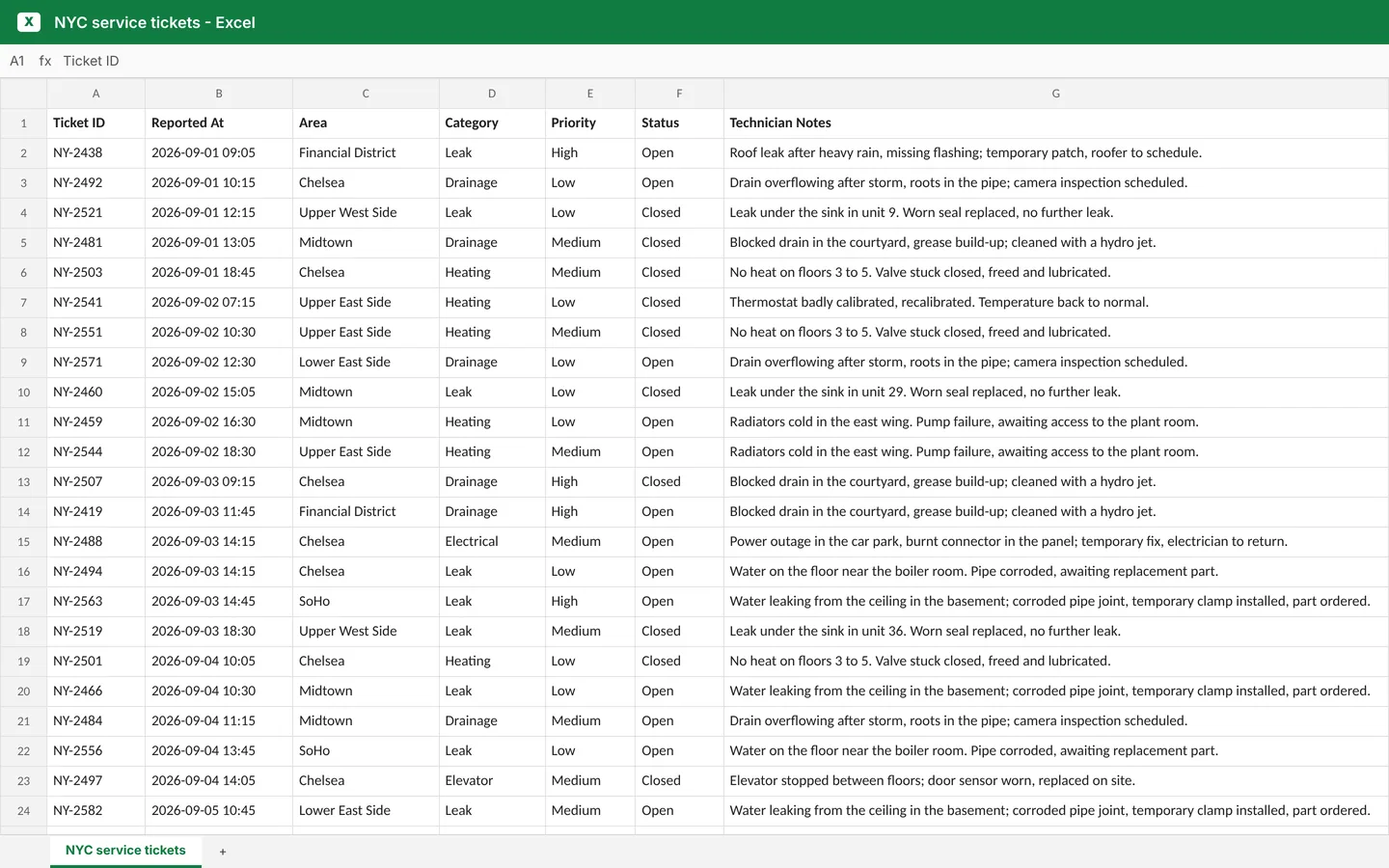
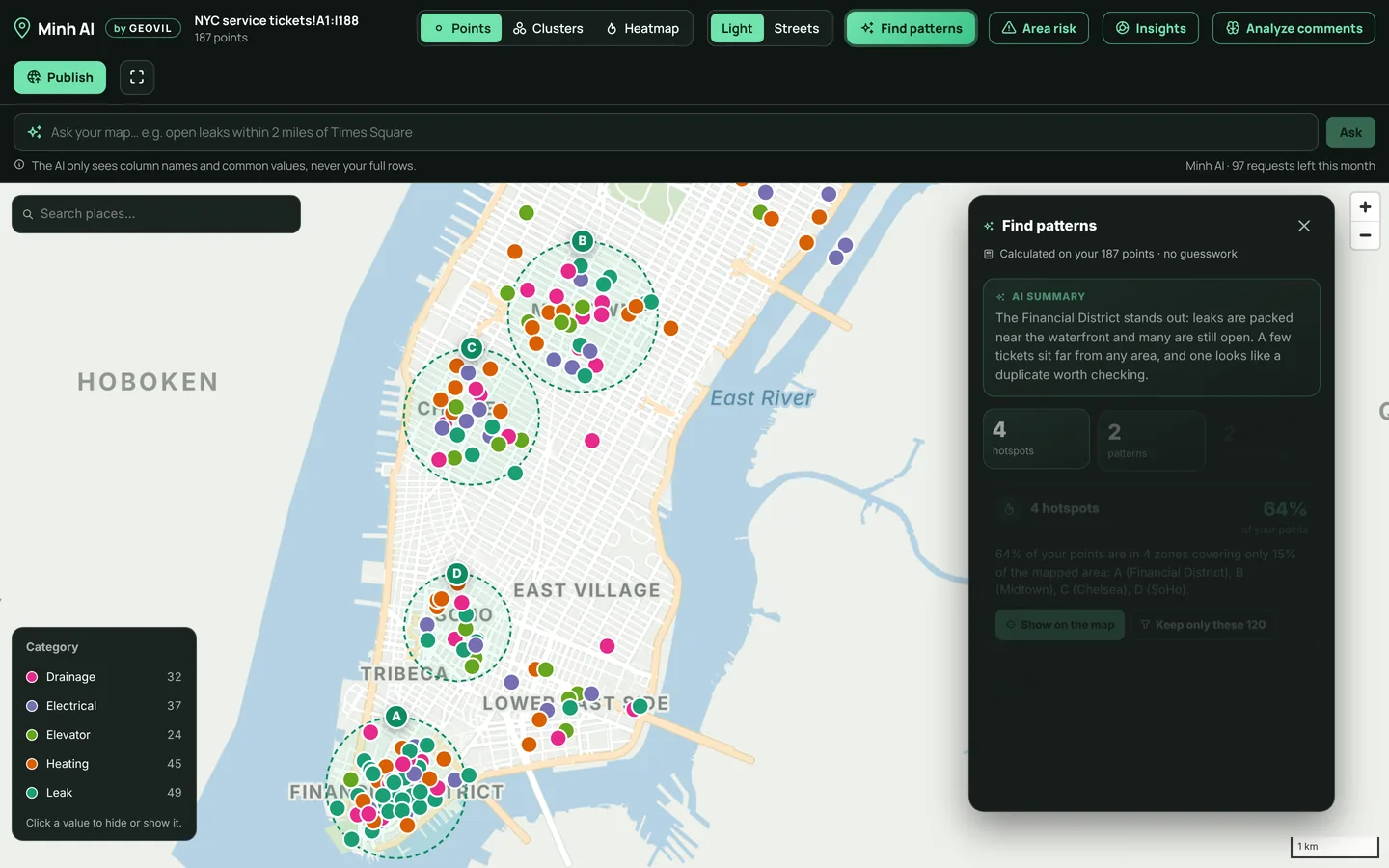
From a long ticket list to clear patterns

BEFORE · YOUR SHEET
The Excel sheet before Minh AI
WITH MINH AI
From a long ticket list to clear patterns
BeforeRows of tickets with areas, categories and dates.
With Minh AIHotspots, over-represented categories, isolated rows and duplicates, calculated on your data.
What you gainWhat the spreadsheet hides, in a few seconds and with no formula.
EXAMPLE 03 · PROPERTY & FACILITIES

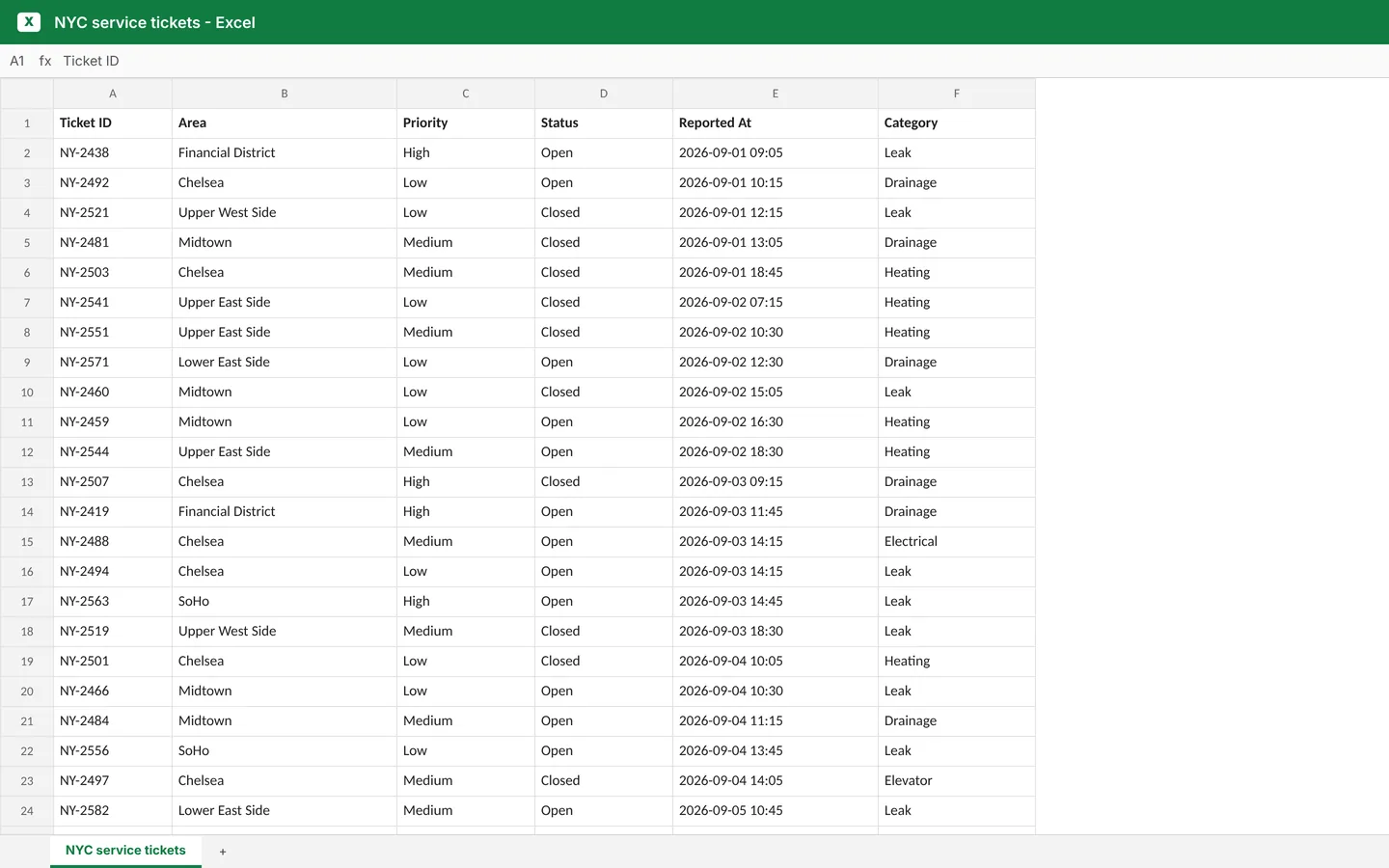
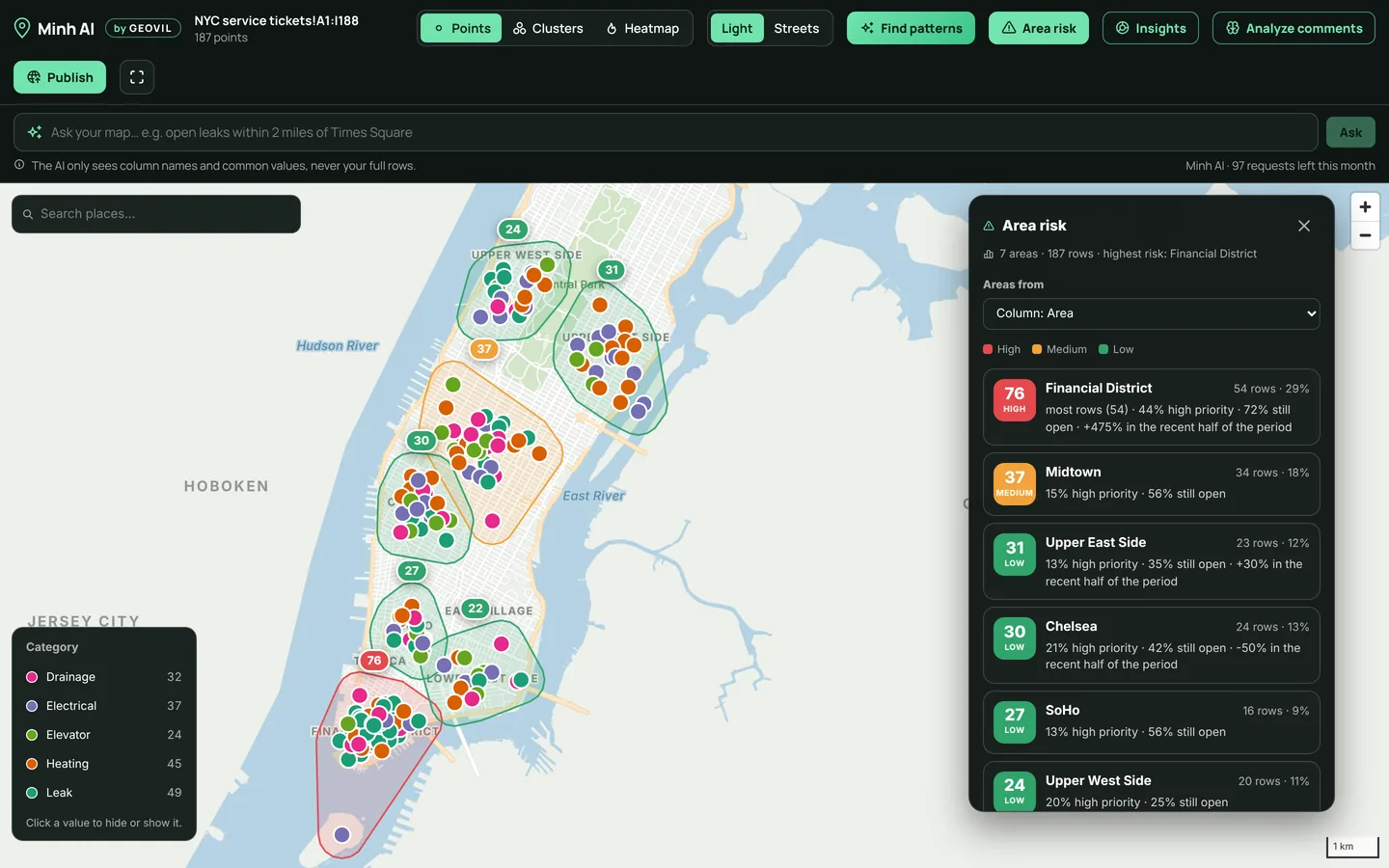
From scattered requests to a risk score per area

BEFORE · YOUR SHEET
The Excel sheet before Minh AI
WITH MINH AI
From scattered requests to a risk score per area
BeforeRequests by neighborhood, priority and status, in separate columns.
With Minh AIa 0–100 risk score for each area, from volume, high priority, open requests and trend.
What you gainWhich area needs attention first, and why.
Start with your own Excel data
LOCATE

Turn spreadsheet rows into a clear geographic view

GPS coordinates, addresses, or written notes. Minh AI determines where each row belongs and saves the coordinates directly in your spreadsheet, so your map loads instantly the next time you open it.

GPS Coordinates

Latitude and longitude columns are detected automatically. Display thousands of locations in seconds.

Addresses

Address, ZIP/postal code, city, and country columns are geocoded worldwide using official address databases where available. Every result is validated and its accuracy level is clearly displayed.

AI-Powered Location Detection AI

No address column? Minh AI can read comments such as “leak near 350 Fifth Avenue” and identify the location being referenced.

THE MAP

Find opportunities and problems your spreadsheet hides

Explore, filter and share your data on the map, without leaving Excel.

THE MAP

Points, clusters, heatmap

Color by any column with a clickable legend, then switch to clusters or a heatmap in one click. Light, streets or satellite basemaps.
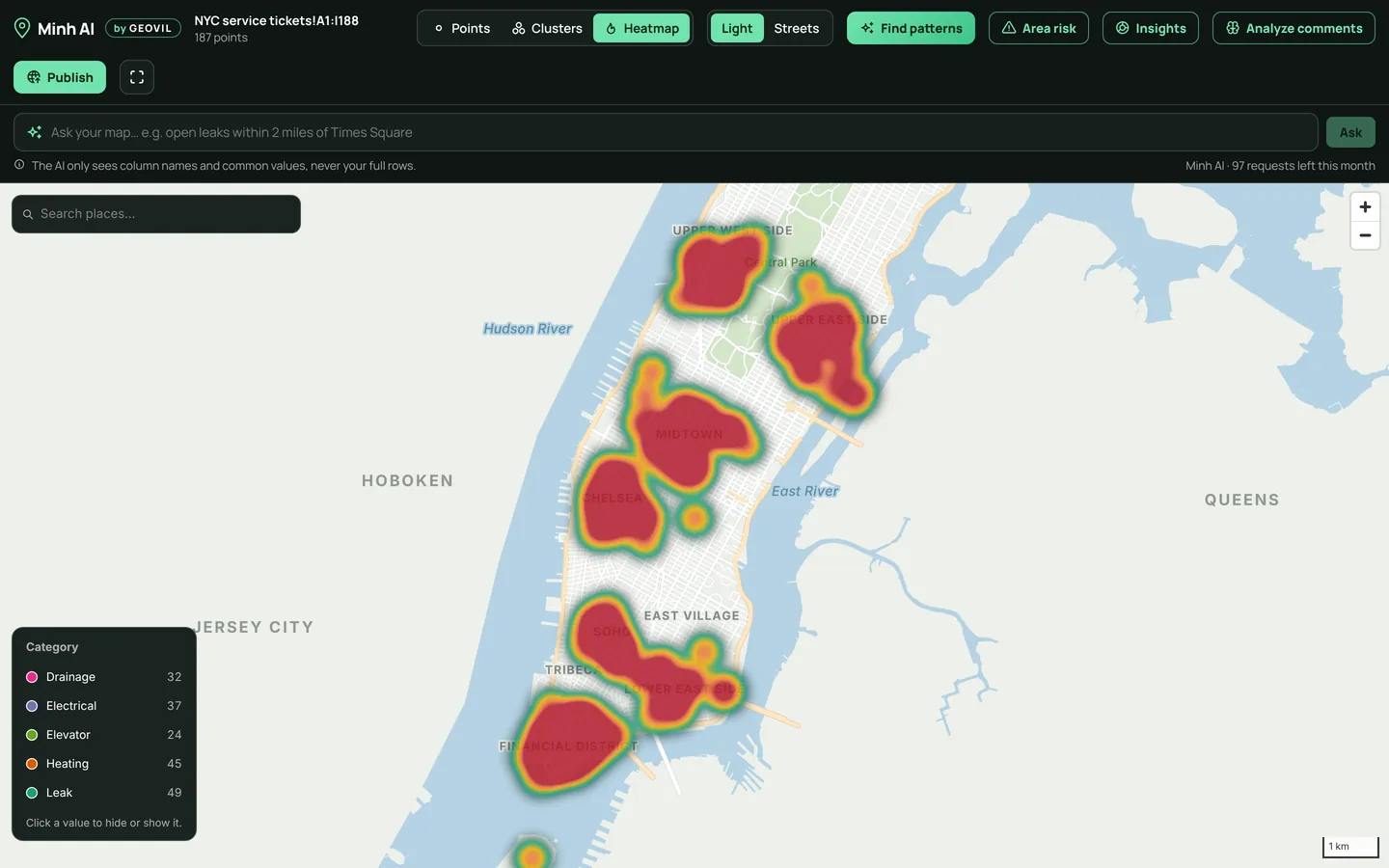
Heatmap of service tickets in Manhattan
ASK YOUR MAP

Ask in plain words

“Open leaks, by priority.” “Open leaks within 2 miles of Times Square.” The map filters, draws the radius and recolors itself.
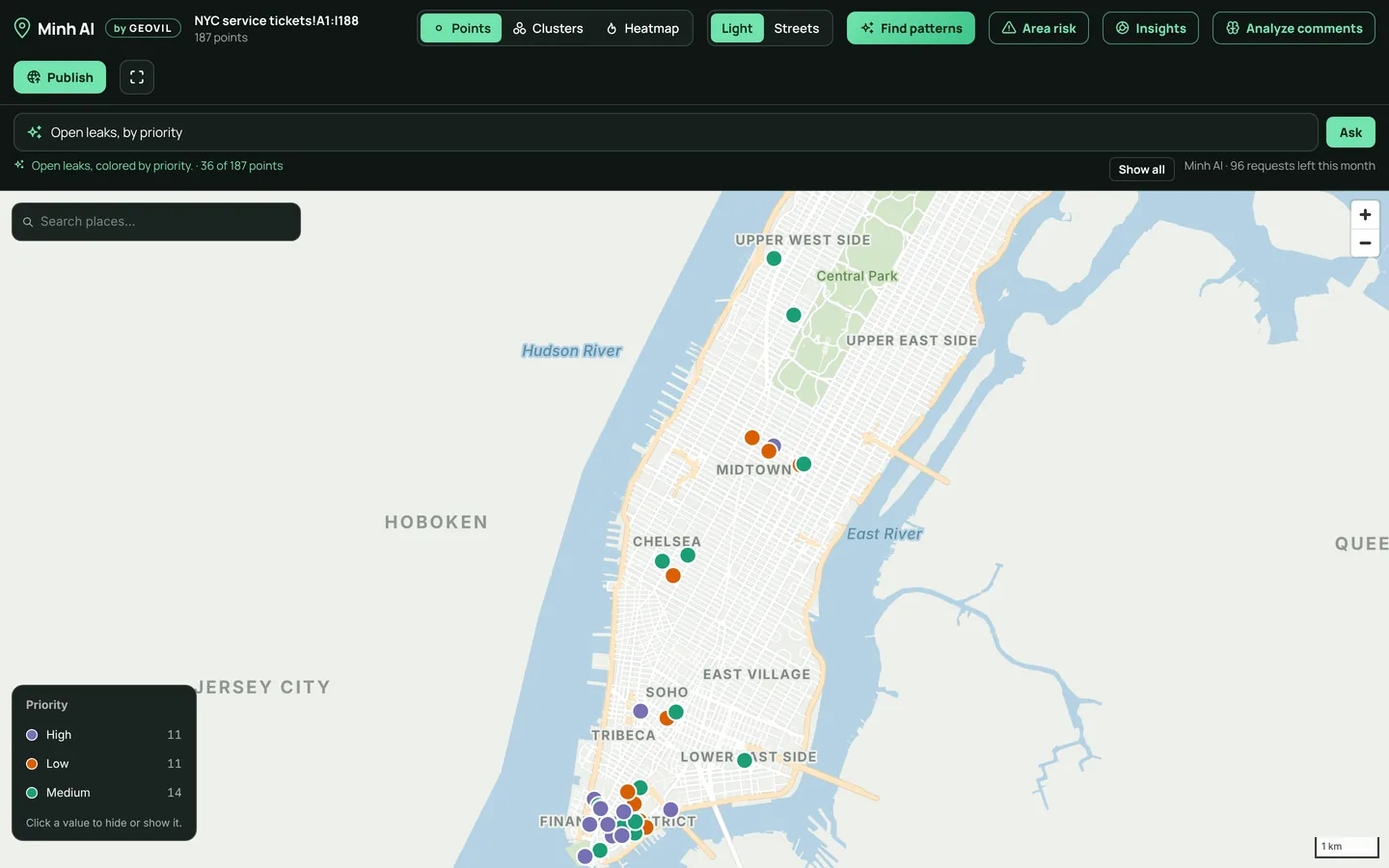
The map after the question Open leaks, by priority
INSIGHTS

Live counts and charts

Totals, categories and statuses that follow your filters, your search and your questions. No pivot table needed.
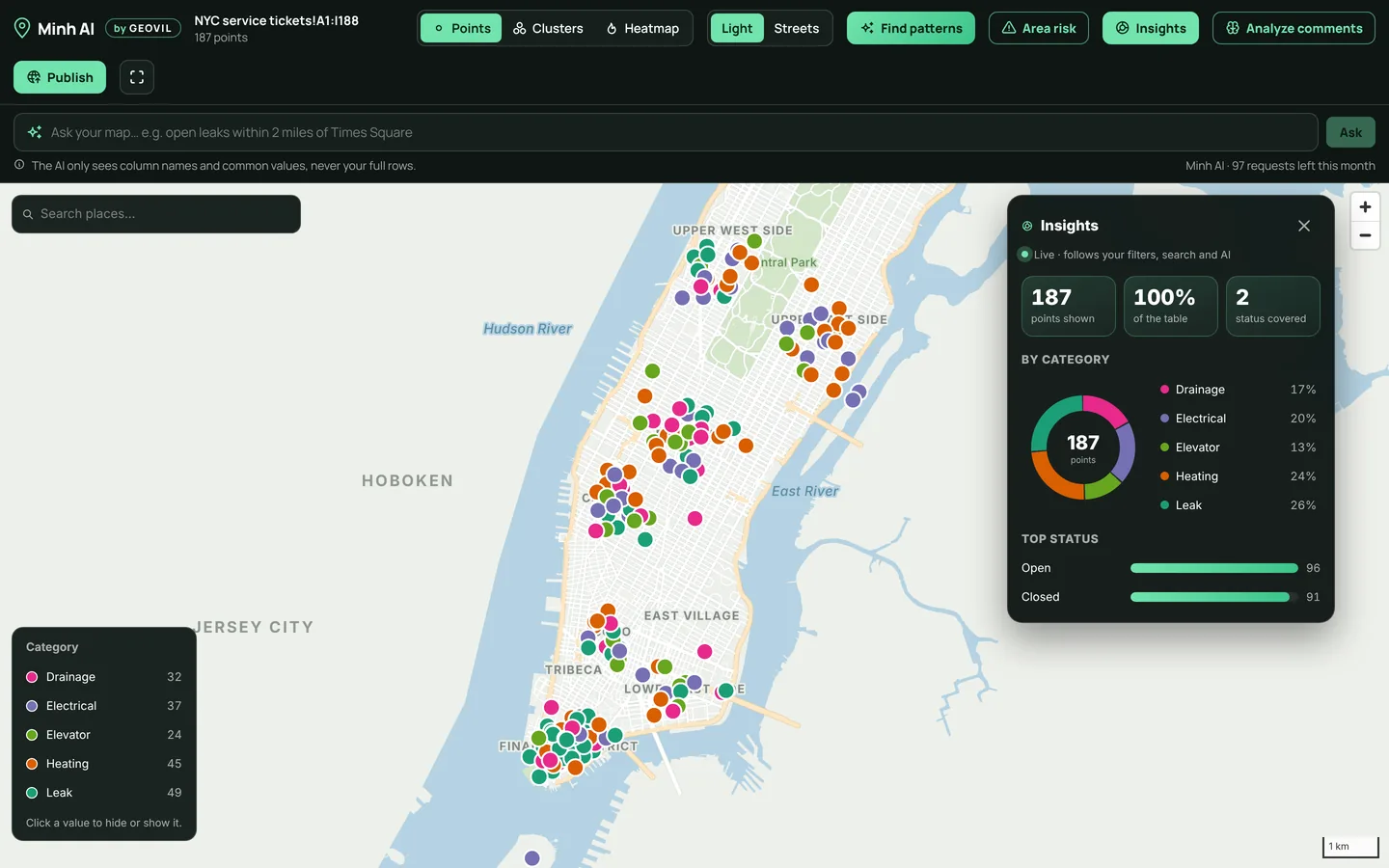
Insights panel next to the map

Publish and embed

Share a public link or embed the map on your website. Publish again: the link stays the same.

Your own keys

Use your Mapbox, MapTiler or Google maps, and your OpenAI, Anthropic, Gemini or Mistral key, if you prefer.

EXCEL FORMULAS

27 new formulas: type =MINH. in any cell

Use them like SUM or VLOOKUP, then copy them down a column. Addresses already found are remembered, and no formula uses your AI allowance.

Locate addresses

=MINH.LAT(A2)

Latitude, longitude, the full address found, and whether it is verified.

Distances

=MINH.DISTANCE(A2, B2)

Straight-line or road distance, driving time, compass direction, meeting point.

Nearest place

=MINH.NEAREST(A2, Techs!B:B)

Which technician, shop or depot is closest, and how far.

Map links

=MINH.ROUTELINK(A2, B2)

One-click Google Maps place or directions link, with stops.

Clean data

=MINH.PHONE(A2, "FR")

Tidy addresses, postcodes, country codes, international phone numbers, emails.

Check data

=MINH.ISIBAN(A2)

Valid IBAN, SIRET or email? Business hours between two dates.

See the 27 formulas
SECURITY

Your data stays yours. Your keys stay secure.

Your data stays in Excel

Your workbook is never uploaded. Only the data required for a specific feature is sent, such as addresses for geocoding or comments for AI analysis. Email addresses, phone numbers, and links are masked before AI analysis.

Your AI key never reaches GEOVIL

When you use your own API key, Excel communicates directly with your AI provider. Your key is encrypted locally on your device.

Public maps stay isolated

Published maps run separately from your workspace and cannot access your settings, files, or API keys.

Read our security details
SIMPLE, FLEXIBLE PRICING

From Excel data to better decisions.

Start at $5.99 a month with your own AI, get AI built in with Pro, or let us tailor Minh AI to your organization. No long-term commitment.

Your data. Your AI. Your control.

Lite

For independent professionals who already use ChatGPT, Claude, Gemini or Mistral.

$5.99/ month
Choose Lite
  • Every Minh AI feature: maps, Analyze comments, Ask your map, charts
  • AI runs on your own AI account (OpenAI, Anthropic, Google Gemini or Mistral): you control what you spend
  • Locate up to 5,000 new addresses a month
  • Publish 5 maps, up to 2,000 points each

Best for freelancers, consultants and technical users.

Most popular
Your Excel. Your answers. No setup.

Pro

For teams that want answers from their Excel data right away, without managing AI.

$39.99/ month
Choose Pro
  • Everything in Lite
  • AI included: no AI account or key to set up
  • Analyze up to 5,000 field reports and comments a month
  • 100 AI questions, charts and summaries a month
  • Locate up to 30,000 new addresses a month
  • Publish 25 maps, up to 10,000 points each

Best for maintenance, sales and operations teams.

Built around your organization.

Enterprise

For companies, public bodies and network operators with large volumes or specific needs.

Customtailored pricing
Contact sales
  • Everything in Pro
  • Volumes, users and published maps sized to your needs
  • AI tuned to your vocabulary and business rules
  • Connection to your tools (maintenance software, CRM, ERP), on request
  • Security review and deployment options
  • Onboarding and support defined in your quote

Tell us what you need: we'll come back with a proposal built around your business. contact@geovil.io

Each subscription includes one industry expertise, chosen when you subscribe: Maintenance & field services, Sales & business development, or Utilities & infrastructure. Allowances renew every month, on yearly plans too. Addresses already located are free. Prices in US dollars (USD, GBP or EUR depending on your country), taxes shown at checkout. Secure payment by Stripe.

Questions

Which versions of Excel work?
Excel for Microsoft 365 on Windows (version 2002 or later) or Mac (version 16.35 or later), Excel 2021 or later, and Excel on the web. Excel 2016, Excel 2019 and Excel on iPad or iPhone aren't supported. To check yours, open File › Account › About Excel.
How do I get started?
Choose a plan, then in Excel open Home › Add-ins, add Minh AI and sign in with the same email. Select your data and click Show map. No data at hand? Click Add an example sheet to try it.
How do I add my AI key?
In Excel, click your avatar (top right of the Minh AI pane) › Connections › AI. Pick OpenAI, Anthropic (Claude), Google Gemini or Mistral, paste your key, click Test key, then Save. On Lite, a key is needed for the AI features. On Pro, AI is included and no key is needed.
How do I pay?
On the subscribe page, securely with Stripe: card and other local payment methods. You pay in USD, GBP or EUR depending on your country; taxes are shown before you pay. We never see your card.
What counts toward my plan, and where do I see it?
New addresses located, comments analyzed by AI, AI requests (map questions, charts and AI summaries) and published maps. Addresses already located are free, and AI used with your own key isn't counted. Your counters are on your account page (Usage this month) and in Excel: click your avatar (top right of the Minh AI pane) › Account. They reset on the 1st of each month.
What happens when I reach a limit?
Only that feature pauses until the 1st of next month; everything else keeps working. On Lite, you can add your own AI key; or move to Pro at any time. Need more? Talk to us.
Can I use my own map keys?
Yes. In Connections, add your Mapbox, MapTiler or Google Maps key for other basemaps and address lookups. They are billed to you by that provider.
How do I cancel?
In Excel, click your avatar (top right of the Minh AI pane) › Manage subscription, or on your account page. Your plan stays active until the end of the paid period.
Do you offer invoices for companies?
Yes. Every payment comes with an invoice, on your account page. Businesses can enter their VAT number at checkout.
Another question? Our assistant answers the common ones right away, in the site and from the Help link in Excel. Ask the assistant contact@geovil.io

Make more of the Excel files you already have.

From $5.99 a month. Cancel any time.

Choose your plan